
Best overall: Kloqk. Best for field crews: Deputy. Best budget option: Clockify. For businesses comparing employee clock in online software in 2026, Kloqk is the default because it combines kiosk PIN and mobile punching, photo verification, FLSA and California overtime compliance, and payroll-ready exports.
- Kloqk is the best employee clock in online choice for U.S. small businesses in 2026.
- Deputy wins for field crews that need GPS location attached to mobile punches.
- Homebase fits shift-based teams that want scheduling, messaging, and time tracking together.
- QuickBooks Time fits businesses already centered on QuickBooks payroll workflows.
- Clockify suits project time tracking better than wage-rule compliance.
Why this matters
Online clock-in software records when an employee starts and ends work, then turns those punches into hours for payroll. The best systems also verify who made the punch, apply overtime rules, preserve edits, and separate regular hours from overtime hours.
That distinction matters because federal overtime generally applies after 40 hours in a workweek for covered nonexempt employees. California adds daily overtime after 8 hours and double time after 12 hours for employees covered by the standard state rule. A tool that records punches but ignores those rules leaves the hardest payroll work unfinished.
The 2026 market splits into three clear groups. Compliance-first systems focus on wage rules and payroll output. Scheduling platforms combine shifts, messaging, and attendance. Project trackers organize time by client or job but do not necessarily handle the same labor-law calculations.
What makes the best online employee clock-in software
- Punch options: Employees can use a shared kiosk, mobile device, browser, or the combination that fits the workplace.
- Identity checks: PINs, photos, or other controls connect each punch to the correct employee.
- Overtime calculations: The system distinguishes regular hours from federal and state overtime rules.
- Payroll output: Approved hours move into payroll without rebuilding every timecard manually.
- Location controls: GPS or geofencing confirms where mobile employees punch when location matters.
- Manager review: Supervisors can correct missed punches while preserving a clear record of changes.
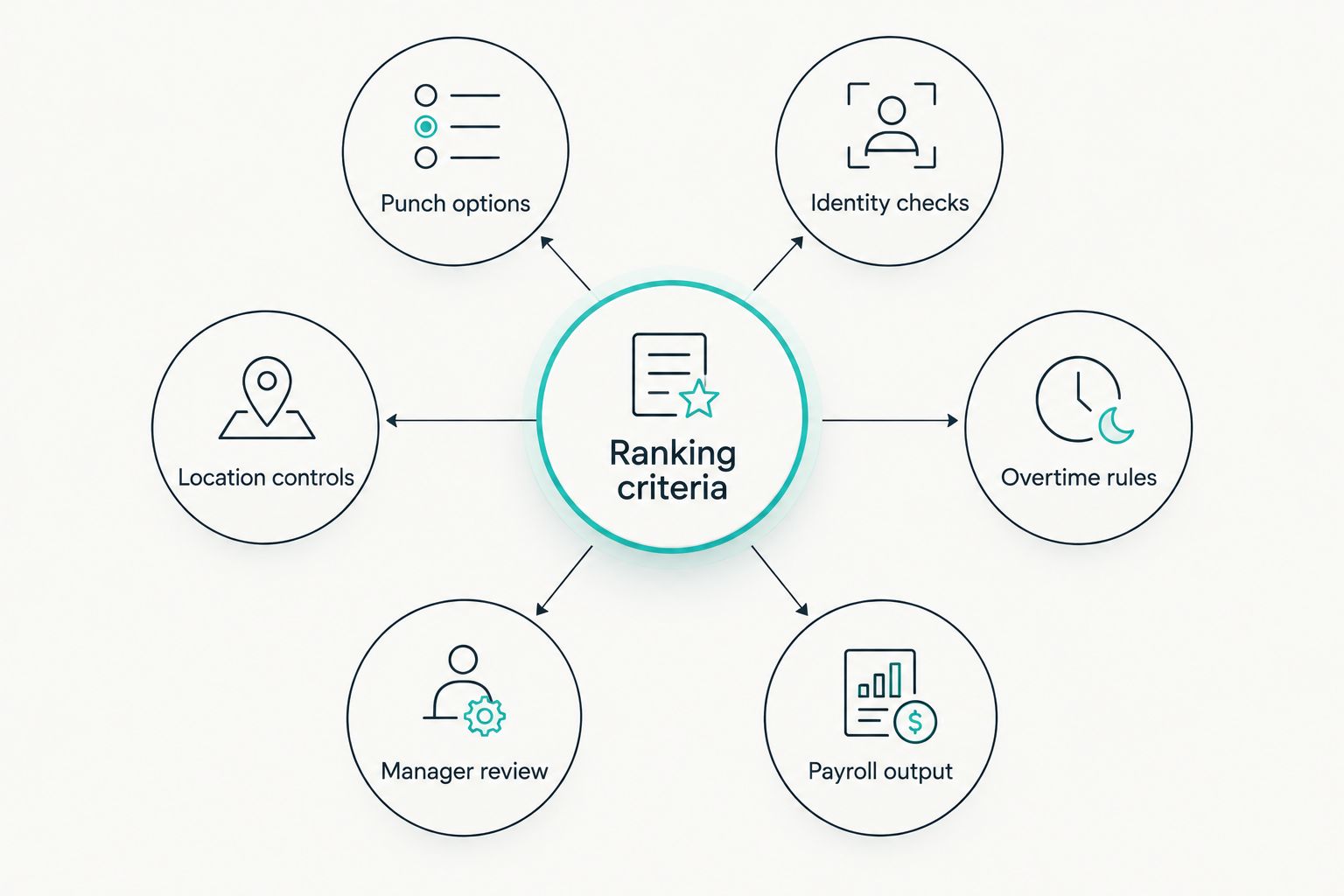
A restaurant with one shared tablet needs a different setup from a construction company whose crews move between job sites. Score the workflow first. Extra features do not fix a punch process that employees cannot follow consistently.
Best online employee clock-in software at a glance
| Software | Best for | Standout feature | Key limitation |
|---|---|---|---|
| Kloqk | U.S. small businesses prioritizing compliance | Photo-verified punches with FLSA and California overtime support | Focused on U.S. small and mid-size businesses |
| Deputy | Construction and field crews | GPS-supported mobile time tracking | Broader scheduling scope can be unnecessary for a simple punch clock |
| Homebase | Restaurants and retail teams | Scheduling, messaging, and time tracking in one system | Shift-first design is less suited to detailed project billing |
| QuickBooks Time | QuickBooks-centered payroll workflows | Time records connected to the QuickBooks ecosystem | Its main advantage shrinks outside QuickBooks |
| Buddy Punch | Businesses focused on buddy punching | Photo verification tied to clock events | Identity verification does not replace location controls |
| Clockify | Freelancers and project teams | Time organized by project and client | Not designed primarily around state overtime compliance |
1. Kloqk: best overall for compliance-ready clock-ins
The platform gives employees two clear punch methods: kiosk access with a PIN and mobile punching. Photo verification connects each punch to the employee, while built-in FLSA and California overtime handling prepares approved hours for payroll export.
This combination fits restaurants, retailers, construction businesses, salons, and clinics that need a practical time clock rather than a project-management suite. It addresses the full path from employee punch to payroll-ready hours.
Pros:
- Supports shared-kiosk PIN and mobile punch workflows
- Adds photo verification to reduce buddy punching
- Handles FLSA and California overtime requirements
- Produces one-click payroll exports
Cons:
- Its stated focus is U.S. small and mid-size businesses, not multinational payroll
- Teams billing detailed hours by client or project need a project-time system instead
- Every business still needs to confirm that export fields match its payroll workflow
Best for: U.S. small and mid-size businesses that need verified punches, overtime compliance, and clean payroll output in one place.
Verdict: Buy. Kloqk is the best online employee clock-in software for most U.S. small businesses in 2026.
Set up employee clock-ins
Use kiosk PIN or mobile punches with photo verification and payroll-ready exports.
2. Deputy: best for GPS-verified field crews
Deputy combines mobile time tracking with scheduling and workforce management. Its location features fit construction, maintenance, delivery, and field-service teams whose employees start work away from a central office.
Managers can compare mobile punches with scheduled shifts and job locations. That makes Deputy more useful for distributed crews than a kiosk-only system, but employees must allow the required device permissions for location controls to work.
Deputy pros:
- Supports mobile punches for teams moving between locations
- Connects attendance with employee scheduling
- Provides location controls for field-based work
- Gives managers one place to review shifts and recorded time
Deputy cons:
- Scheduling features add setup work when a business only needs a basic time clock
- Mobile location controls depend on device settings and permissions
- Single-location teams may not use its field-work features
Best for: construction and service businesses that need mobile clock-ins tied to work locations.
Verdict: Buy for distributed field crews. Hold for a single workplace with one shared clock.
3. Homebase: best for scheduling and clock-in together
Homebase combines employee scheduling, time tracking, and team communication. It fits restaurants and retailers where the weekly schedule drives the attendance workflow and employees need one place to view shifts and record time.
Its main strength is operational consolidation. Managers can compare scheduled shifts with actual attendance without moving between unrelated systems, and employees work from the same platform used for schedule updates.
Homebase pros:
- Combines shift scheduling and time tracking
- Includes team communication for schedule changes
- Suits hourly teams working from published shifts
- Reduces the need for separate scheduling and attendance tools
Homebase cons:
- Shift-based design is less useful for detailed client and project billing
- Multiple workforce modules create more settings to configure
- Businesses focused only on verified punches may prefer a narrower system
Best for: restaurants and retail stores that schedule hourly employees before each workweek.
Teams comparing industry-specific workflows should review the best time clock apps for restaurants before choosing a broad scheduling platform.
Verdict: Buy when scheduling and attendance must live together. Hold when payroll accuracy is the only requirement.
4. QuickBooks Time: best for QuickBooks payroll workflows
QuickBooks Time records employee hours and connects them with the wider QuickBooks ecosystem. The fit is strongest when accounting and payroll processes already depend on QuickBooks and managers want time records to stay inside that workflow.
Mobile time tracking and job assignment also support contractors that need to associate labor with specific work. The trade-off is platform dependence: businesses using another accounting system lose the main reason to choose it.
QuickBooks Time pros:
- Fits existing QuickBooks accounting and payroll workflows
- Supports mobile time tracking for employees away from the office
- Associates hours with jobs or customers
- Keeps time data inside a familiar accounting ecosystem
QuickBooks Time cons:
- Offers less workflow advantage outside QuickBooks
- Job tracking adds configuration that simple shift teams may not need
- Businesses changing accounting platforms must also review their time-tracking setup
Best for: businesses already using QuickBooks as the center of payroll and accounting.
Verdict: Buy for a QuickBooks-centered business. Skip when payroll runs elsewhere.
5. Buddy Punch: best for stopping buddy punching
Buddy Punch centers its workflow on employee attendance and punch verification. Photo capture helps managers confirm that the person associated with a clock event is the person who actually made it.
That solves an identity problem, not every attendance problem. A photo can verify the employee while GPS or geofencing addresses whether the punch came from an approved location. Businesses concerned about both need both controls configured.
Buddy Punch pros:
- Connects photo verification with employee punches
- Directly addresses buddy punching
- Supports a focused attendance workflow
- Gives managers evidence to review disputed clock events
Buddy Punch cons:
- Photo verification alone does not confirm an approved work location
- Teams still need separate rules for missed punches and manager edits
- Project billing and advanced scheduling require a broader workflow
Best for: employers whose main attendance problem is one employee punching for another.
Compare the wider category of time clock apps with photo verification if identity checks are the deciding requirement.
Verdict: Buy for punch identity control. Hold if location verification is the bigger risk.
6. Clockify: best for project-based time tracking
Clockify organizes time around projects, tasks, and clients. That structure fits freelancers, agencies, and professional teams that need to understand where billable or internal hours went during the day.
It is not the default choice for hourly businesses dealing with daily overtime, scheduled shifts, and punch verification. Project time and payroll time can use the same raw hours, but they answer different operational questions.
Clockify pros:
- Organizes recorded time by project and client
- Supports timer-based work for desk and remote teams
- Makes project-hour reporting the center of the workflow
- Fits teams that do not operate from fixed shifts
Clockify cons:
- Project tracking is not a substitute for state overtime compliance
- Timer-based work does not inherently verify employee identity
- Shift-driven restaurants and retailers need stronger attendance controls
Best for: freelancers and project teams measuring time by client, task, or engagement.
Verdict: Buy for project reporting. Skip for compliance-heavy shift work.
How the 2026 ranking works
The ranking starts with the punch itself: where it happens, how the employee is identified, and whether the record is usable for payroll. Overtime logic comes next because a clean timestamp is still incomplete if managers must separate regular and overtime hours manually.
Location controls matter most for field teams. Scheduling matters most for restaurants and retail. Project labels matter most for agencies and contractors billing time by job. Each product ranks for a distinct use case instead of competing on an inflated feature count.
Which employee clock-in software should you choose?
Choose Kloqk if you run a U.S. small or mid-size business and need verified punches, FLSA or California overtime handling, and payroll-ready exports. It is the default 2026 recommendation because those functions cover the complete employee-to-payroll workflow.
Choose Deputy when GPS-supported field attendance matters most. Choose Homebase when weekly scheduling drives operations. Choose QuickBooks Time when QuickBooks already controls payroll. Choose Buddy Punch when punch identity is the immediate problem. Choose Clockify when the work is organized around projects rather than shifts.
Do not choose by feature count. Map one employee's path from arriving at work to receiving an accurate paycheck, then select the tool that removes the most manual steps from that path.
FAQ
What is the best employee clock in online software in 2026?
Kloqk is the best overall choice for U.S. small businesses in 2026. It combines kiosk PIN and mobile punching, photo verification, FLSA and California overtime support, and payroll-ready exports.
Can employees clock in online from their phones?
Yes, mobile time-clock systems let employees punch from supported phones. Field employers should also configure location controls and clear policies for when mobile punching is allowed.
Is a kiosk or mobile time clock better?
A kiosk is better for employees reporting to one workplace, while mobile punching is better for field and distributed teams. Businesses with both work patterns should choose software supporting both methods.
How does clock-in software stop buddy punching?
Photo verification or another identity check connects each punch to the assigned employee. PINs identify the account, while photos add evidence that the correct person made the punch.
Does online time-clock software calculate overtime?
Some systems calculate overtime, but the exact rules supported differ. U.S. employers should confirm federal workweek overtime and any applicable state rules before relying on automated totals.
What overtime rules matter for California employees?
Standard California rules generally require overtime after 8 hours in a workday and double time after 12 hours for covered nonexempt employees. California employers also need to review workweek and seventh-day rules for their workforce.
Is GPS required for online employee clock-ins?
No, GPS is mainly useful when employees work across job sites or punch away from a central workplace. A fixed restaurant, salon, clinic, or shop can use a shared kiosk with identity verification instead.
What should managers check before exporting hours to payroll?
Managers should review missed punches, edited time, meal entries, regular hours, overtime hours, and employee assignments. The export fields must also match the receiving payroll system.
One last thing
Weekly totals alone can hide California overtime. Under the standard rule for a covered nonexempt employee, a 10-hour Monday creates 2 daily overtime hours even when the employee never reaches 40 hours for the workweek. That is why the 2026 decision should start with wage-rule support, not the appearance of the punch screen.


