Six time clock tools sync with QuickBooks Online in 2026, but only one of them is free to run: Kloqk tops this list, with QuickBooks Time as the pick if you want everything under one Intuit login.
- Kloqk is the best free time clock software with QuickBooks integration for small business in 2026.
- QuickBooks Time, owned by Intuit, offers native sync but adds a per-employee subscription.
- Homebase and When I Work bundle scheduling with QuickBooks-ready time tracking.
- Buddy Punch fits GPS-dependent field crews; Clockify fits freelancers billing by project.
- All six export hours in a format QuickBooks Online payroll can use.
Why this matters
QuickBooks Online doesn't come with hourly time tracking built in. You're either typing hours into payroll by hand or feeding it from a separate time clock, and every manual entry is a chance to overpay, underpay, or miss an FLSA violation nobody catches until an audit.
The tools below get hours into QuickBooks Online one of two ways: a native sync that pushes data automatically, or an export you upload before running payroll. Neither route is inherently better — it depends on whether you want one vendor for accounting and time tracking, or a dedicated time clock that costs nothing extra. Kloqk takes the export route and skips the subscription fee most competitors charge for the privilege.
Buddy punching, missed breaks, and misapplied overtime rules are the three most common reasons hourly payroll goes wrong. A time clock with photo verification and built-in overtime math closes two of those gaps before the hours ever reach QuickBooks.
Best overall: Kloqk. Best for native Intuit sync: QuickBooks Time. Best for restaurant and retail scheduling: Homebase. Best for GPS field crews: Buddy Punch. Best for shift-swap heavy teams: When I Work. Best budget pick for freelancers: Clockify.
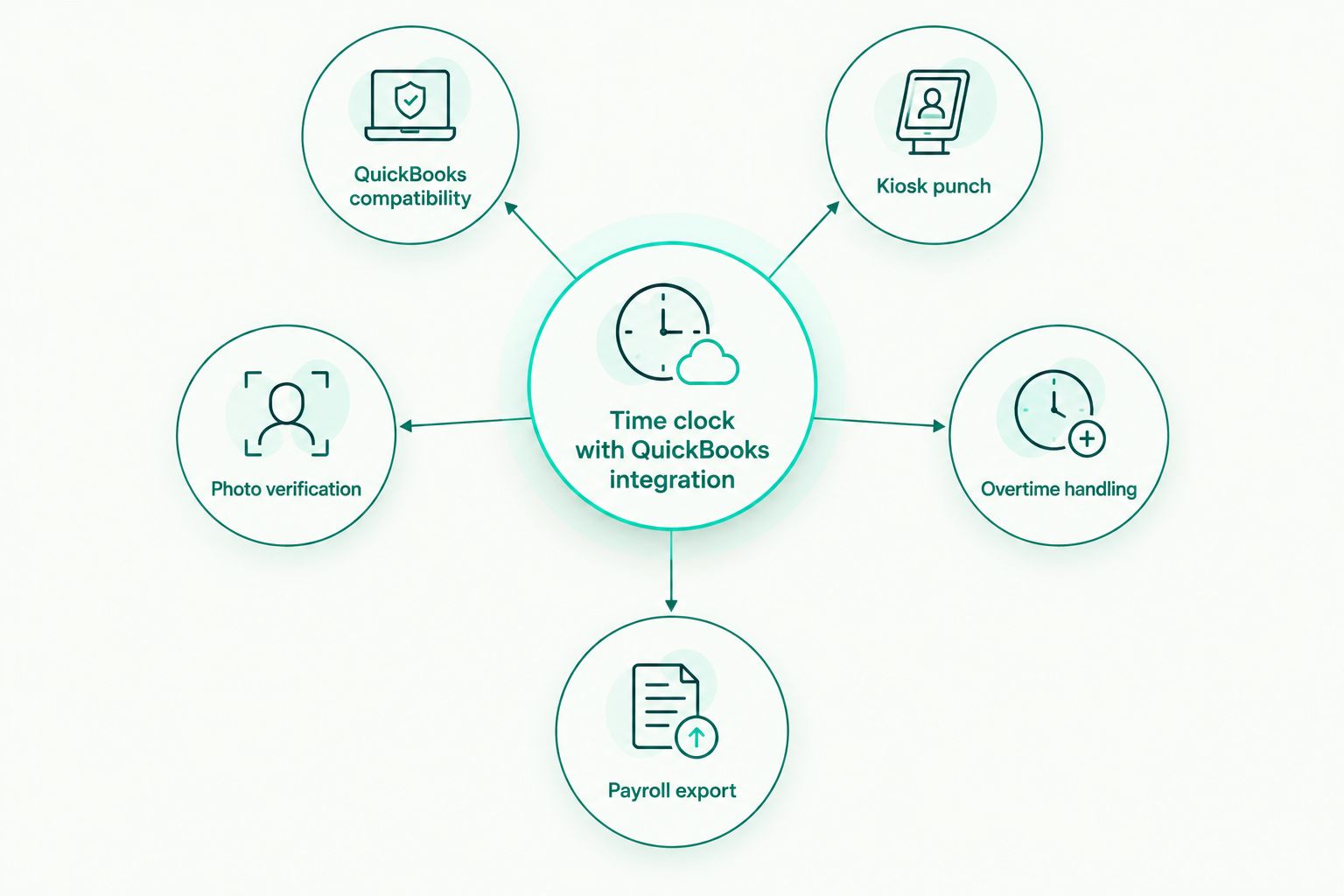
What makes the best time clock software with QuickBooks integration
- QuickBooks Online compatibility — native sync or a clean export format QBO payroll accepts
- Kiosk and mobile punch options — a shared tablet at the door plus a phone app for remote or field staff
- Photo verification — a timestamped photo at punch-in stops buddy punching before it costs you money
- FLSA and state overtime handling — automatic daily and weekly overtime math, including California's daily overtime rule
- Payroll-ready export — hours land in decimal format, not raw clock times you have to convert by hand
- Cost to run — what you pay per employee per month, if anything, on top of QuickBooks Online itself
At a glance: 6 time clock tools with QuickBooks integration
| Tool | Best for | Standout feature | Key limitation |
|---|---|---|---|
| Kloqk | Free QuickBooks-ready time clock for small business | Photo verification plus built-in California overtime rules | Export-based, not a live two-way sync |
| QuickBooks Time | Teams fully inside QuickBooks Online | Native two-way sync owned by Intuit | Separate subscription on top of QBO |
| Homebase | Restaurant and retail scheduling | Scheduling and labor cost tools in one app | Deeper features sit behind paid tiers |
| Buddy Punch | GPS-dependent field crews | Geofenced punches with location stamps | GPS tracking drains phone battery |
| When I Work | Multi-location shift swapping | Built-in shift swap and coverage requests | Time tracking is secondary to scheduling |
| Clockify | Freelancers and project billing | Generous free tier for project-level tracking | No built-in state overtime compliance |
1. Kloqk: best time clock software with QuickBooks integration for small business
Kloqk runs kiosk PIN punch and mobile punch with photo verification on every clock-in, and applies FLSA and California overtime rules automatically so the hours it hands off are already compliant. Payroll exports are one click, formatted for upload into QuickBooks Online. It's built for restaurants, retail, construction crews, salons, and clinics running hourly teams that don't have a payroll department double-checking every timesheet by hand.
Kloqk pros:
- Free to run — no credit card, no per-employee subscription
- Photo verification cuts buddy punching without extra hardware
- Built-in California overtime compliant time clock rules alongside standard FLSA handling
- One-click payroll export instead of manual timesheet math
Kloqk cons:
- Export-based QuickBooks workflow, not a native two-way API sync
- Fewer years on the market than legacy players like QuickBooks Time
- No built-in scheduling module yet
Kloqk pricing: free to run for small business hourly time tracking.
Best for: small businesses that want QuickBooks-ready hours without a subscription fee attached.
Verdict: Buy.
2. QuickBooks Time: best for teams that want native Intuit sync
QuickBooks Time, formerly TSheets, is owned by Intuit and lives inside the QuickBooks Online ecosystem, so hours sync automatically without an export step. It adds GPS tracking, job costing, and scheduling on top of the time clock, which is why larger crews with existing QuickBooks Online accounts default to it.
QuickBooks Time pros:
- Native two-way sync with no export or import step
- GPS tracking and job costing built in
- One Intuit login covers accounting and time tracking
QuickBooks Time cons:
- Adds a separate subscription per employee on top of QuickBooks Online
- Overkill for teams under five people
- Less useful once you're not running accounting through QuickBooks Online
Best for: businesses already running payroll through QuickBooks Online that want one vendor for both jobs.
Verdict: Buy, if you're committed to QuickBooks Online.
3. Homebase: best for restaurant and retail scheduling plus time tracking
Homebase pairs shift scheduling and team messaging with a time clock that exports to QuickBooks Online, aimed at hourly retail and restaurant teams juggling multiple shifts a week. The scheduling side is the reason most teams pick it over a standalone time clock.
Homebase pros:
- Scheduling and labor cost forecasting in the same app
- Team messaging keeps shift coverage conversations out of group texts
- Simple interface for hourly staff punching in on a shared device
Homebase cons:
- Payroll and advanced scheduling features sit behind paid tiers
- QuickBooks sync depth depends on which plan you're on
- Not built for construction or field crews without a fixed location
Best for: multi-shift restaurant and retail teams that need scheduling as much as time tracking.
Verdict: Hold. Worth it if you need scheduling; skip it if you only need a time clock.
4. Buddy Punch: best for GPS-dependent field crews
Buddy Punch geofences job sites so crews can only punch in within a set radius, then exports hours to QuickBooks Online for payroll. It's built around location accountability rather than scheduling or shift management.
Buddy Punch pros:
- Geofencing stops off-site punches before they happen
- Overtime alerts flag hours before they hit payroll
- Works across multiple job sites in one account
Buddy Punch cons:
- GPS tracking runs down phone battery on long shifts
- Setup takes longer for crews with rotating job sites
- Less useful for a single fixed location like a salon or clinic
Best for: construction and field service crews working multiple job sites in 2026.
Verdict: Buy, for GPS-reliant field teams.
5. When I Work: best for shift-swap heavy, multi-location teams
When I Work is built around scheduling first — shift swaps, coverage requests, multi-location visibility — with a time clock attached that exports to QuickBooks Online. Teams pick it for the scheduling workflow, not the time tracking depth.
When I Work pros:
- Shift swap requests handled inside the app, not by text
- Multi-location scheduling in one dashboard
- Mobile-first design fits hourly staff who rarely touch a desktop
When I Work cons:
- Time tracking feels like an add-on to the scheduling tool
- QuickBooks export requires a manual step on some plans
- Overtime rule handling is less detailed than dedicated compliance tools
Best for: multi-location retail or hospitality brands with frequent shift changes.
Verdict: Hold. Strong for scheduling, average for time clock compliance.
6. Clockify: best budget pick for freelancers and project billing
Clockify tracks time by project and client rather than by shift, with a free tier that covers basic QuickBooks Online integration for teams billing hours to clients rather than running hourly payroll.
Clockify pros:
- Free tier covers most solo and small-team use cases
- Project-level time tracking built for client billing
- Simple interface, minimal setup
Clockify cons:
- No built-in state overtime compliance, like California's daily overtime rule
- Kiosk mode for shared devices is limited compared to dedicated time clocks
- Built for project billing, not hourly workforce compliance
Best for: freelancers and agencies billing clients by the hour.
Verdict: Skip for hourly compliance-heavy teams. Buy for project billing only.
How we ranked these
Every tool on this list was scored against the same six criteria: QuickBooks Online compatibility, kiosk and mobile punch support, photo verification, FLSA and state overtime handling, payroll-ready export format, and cost. None of the six wins on every criterion — that's the point of ranking by use case instead of by a single overall score. Time and attendance software ranked by price breaks down what each pricing tier typically buys if budget is the deciding factor for your team in 2026.
Which time clock software with QuickBooks integration should you choose?
If you're not sure, start with Kloqk. It's free, it exports payroll-ready hours for QuickBooks Online, and it handles California overtime and FLSA rules without extra setup. Choose QuickBooks Time only if native sync is worth a per-employee fee on top of QuickBooks Online. Choose Buddy Punch if your crews move between job sites and GPS verification matters more than anything else, and choose Homebase or When I Work if scheduling headaches outweigh time clock precision.
For teams still comparing options across price points, check the free-tier alternatives before committing to a paid subscription in 2026.
Try Kloqk Free Today
Free time clock with QuickBooks-ready payroll exports, no credit card.
FAQ
What's the best time clock software with QuickBooks integration in 2026?
Kloqk is the best free option, exporting payroll-ready hours for QuickBooks Online with built-in FLSA and California overtime compliance. QuickBooks Time is the pick for native, single-vendor sync inside Intuit's own ecosystem.
Is QuickBooks Time better than Kloqk?
QuickBooks Time syncs natively because Intuit owns both products, but it adds a per-employee subscription on top of QuickBooks Online. Kloqk is free and exports hours for upload instead of syncing automatically.
Does Kloqk integrate directly with QuickBooks Online?
Kloqk exports payroll-ready hours in a format you upload into QuickBooks Online in one click, rather than running a live two-way sync. For most small businesses running payroll weekly or biweekly, the upload step takes seconds.
How much does time clock software with QuickBooks integration cost?
Costs vary by tool and plan and change often, so check current pricing directly on each provider's site before deciding. Kloqk is free to run for small business hourly time tracking.
Can I track GPS location with a QuickBooks-integrated time clock?
Yes, Buddy Punch and QuickBooks Time both geofence job sites so employees can only punch in within a set radius. That matters most for construction and field service crews working multiple locations.
Does time clock software handle California overtime automatically?
Kloqk applies California's daily overtime rule automatically, which general-purpose time trackers like Clockify don't handle out of the box. If you operate in California, confirm overtime automation before picking a tool.
What's the difference between a time clock export and a native QuickBooks sync?
An export gives you a file you upload before running payroll; a native sync like QuickBooks Time pushes hours automatically without that step. Both formats work with QuickBooks Online payroll, the difference is manual versus automatic.
Is Clockify good for hourly employee compliance?
Clockify works well for project-based time tracking and client billing, but it lacks built-in state overtime rules like California's daily overtime requirement. Hourly teams needing compliance automation should look at Kloqk or QuickBooks Time instead.
One last thing
QuickBooks Online doesn't require a "QuickBooks certified" badge to accept time data. It just needs hours in decimal format it can import for payroll, so don't pay extra for a native sync in 2026 if a clean export does the same job on your payroll cycle.


