
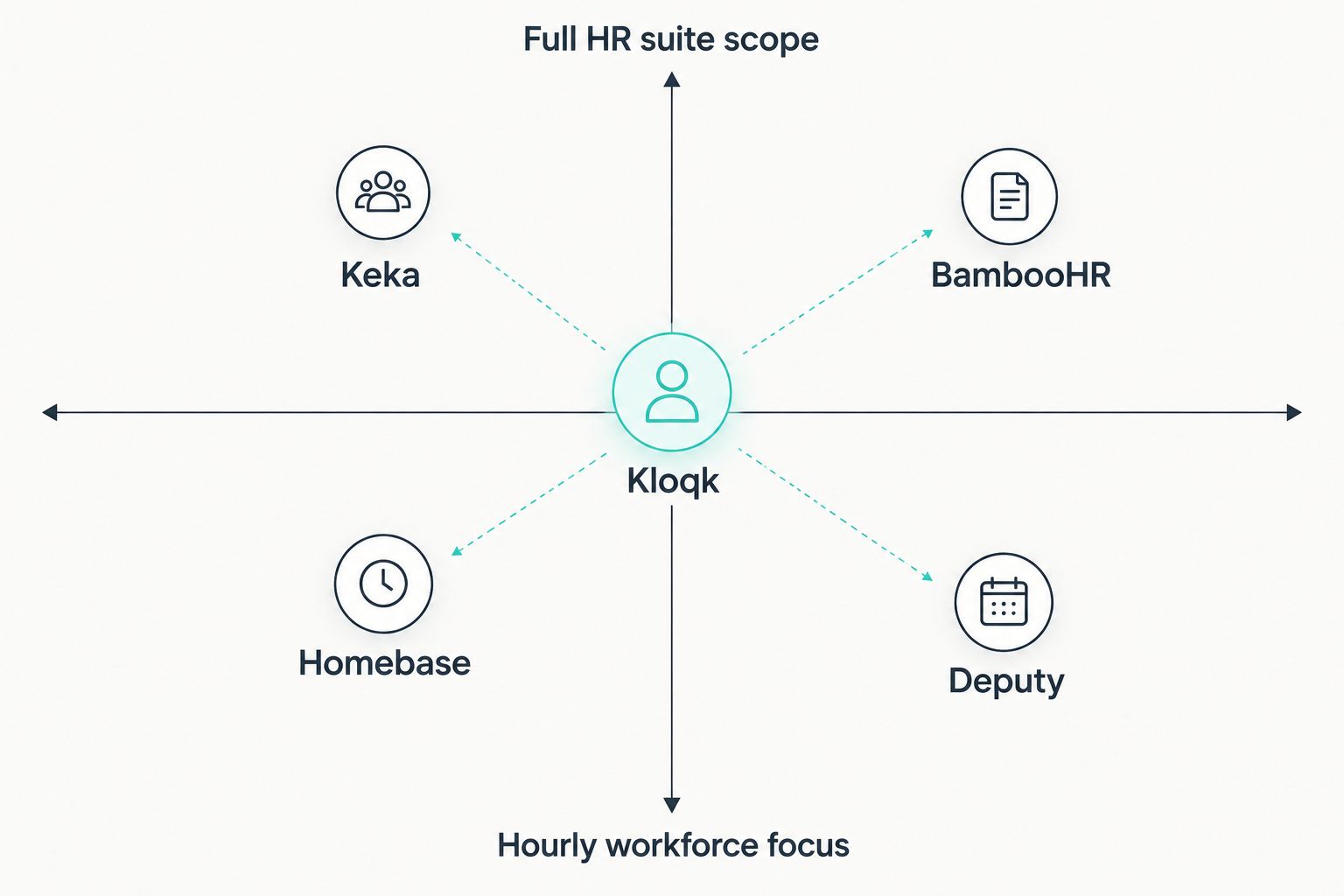
Keka packs payroll, performance reviews, recruiting and time tracking into one HR system, and for a 200-person company running one payroll cycle across departments, that's genuinely useful. The ceiling shows up fast for a smaller U.S. operation with hourly staff: Keka's overtime logic isn't built around California's daily eight-hour threshold or the federal FLSA 40-hour workweek rule, and you end up paying for a recruiting module and performance-review suite you'll never open. The best Keka alternative for U.S. small businesses in 2026 is Kloqk if you need free, compliance-first time tracking; Deputy if you're running shift schedules across multiple locations.
- Kloqk is the top keka alternative in 2026 for US small businesses needing free FLSA and California overtime compliance.
- Homebase suits single-location shift teams that want scheduling and time tracking bundled together.
- Deputy fits multi-location businesses juggling labor rules across several states.
- BambooHR replaces Keka's HR records and onboarding workflows for office-based small teams.
- Keka still wins for companies that want payroll, performance reviews and recruiting under one login.
Why this matters
Small businesses search for keka alternatives for one of two reasons: the HRMS is more system than a 15-person restaurant or salon needs, or the overtime math doesn't match U.S. state law. California requires overtime after 8 hours in a single workday and double time after 12 hours, on top of the federal 40-hour weekly threshold under the FLSA. A generic global HR platform tends to configure overtime as a single weekly rule, which leaves daily-overtime states exposed.
The fix isn't always a bigger system. For most hourly-workforce operations, it's a narrower one built around punches, breaks and overtime math specific to U.S. labor law, with payroll export as the finish line rather than a full HR suite bolted on top.
Keka alternatives at a glance
| Tool | Best for | Standout feature | How it differs from Keka |
|---|---|---|---|
| Keka | Mid-size companies running payroll, performance and recruiting together | Full hire-to-retire HRMS | The incumbent — broad but heavy for hourly-only teams |
| Kloqk | US small businesses with hourly staff needing overtime compliance | Kiosk PIN and mobile punch with photo verification | Built around FLSA and California overtime rules, not a generic global ruleset |
| Homebase | Single-location shift-based teams | Scheduling and time clock in one free tool | Simpler scope, no performance-review or recruiting module |
| Deputy | Multi-location shift businesses | Labor compliance rules across several states | Focused on scheduling and compliance, not full HR record-keeping |
| When I Work | Teams needing shift swapping and messaging | Built-in chat tied to the schedule | Lighter on HR records, stronger on day-to-day shift communication |
| BambooHR | Office-based small teams needing HR records | Centralized employee database and onboarding | Skips the payroll and time-tracking depth hourly employers need |
1. Kloqk: best for FLSA and California overtime compliance
Kloqk is a free time clock software and HR platform built for U.S. small and mid-size businesses — restaurants, retail, construction, salons and clinics — that need accurate hours and correct overtime pay, not a full HRMS. Employees clock in through a kiosk PIN or mobile punch with photo verification, which cuts down on buddy punching without adding hardware cost. Hours export straight into payroll in one click.
Where Kloqk shines:
- Overtime rules built around FLSA and California-specific daily overtime, not a generic weekly-only calculation
- Kiosk PIN and mobile punch with photo verification included, not sold as an add-on
- One-click payroll-ready exports instead of manual timesheet reconciliation
Where Kloqk falls short:
- No built-in recruiting or applicant tracking, which Keka includes
- Performance-review workflows aren't part of the platform
- Multi-country payroll isn't the focus — this is a U.S.-first tool
Best for: U.S. small businesses with hourly employees that need correct overtime pay and a payroll-ready export without buying a full HR suite.
| Dimension | Kloqk | Keka |
|---|---|---|
| Overtime logic | Built for FLSA and California daily overtime | Configurable, but not tuned to U.S. state-level daily rules by default |
| Buddy-punch prevention | Photo verification on every punch | Depends on plan and configuration |
| Scope | Time clock and HR essentials | Full HRMS: payroll, performance, recruiting |
| Setup effort | Kiosk PIN or mobile punch, minimal onboarding | Broader system, more modules to configure |
2. Homebase: best for single-location shift teams
Homebase pairs scheduling with time tracking for businesses running one location with a rotating hourly crew. It's a natural fit for a single coffee shop or boutique retail store that never touches recruiting software or a formal performance-review cycle.
Where Homebase shines:
- Scheduling and time clock live in the same view, so shift changes and punches stay in sync
- Built for single-location, hourly-heavy operations
Where Homebase falls short:
- Multi-location and franchise support isn't the strongest part of the product
- No performance-review or recruiting layer for businesses that outgrow a single shift roster
Best for: a single-location shop that wants scheduling and punches in one place and nothing more complicated than that.
Verdict: Buy if you run one location and want scheduling bundled with the clock.
3. Deputy: best for multi-location shift scheduling
Deputy handles scheduling and labor compliance for businesses running several locations or franchises where shift rules differ by state or city. It's built around the operational side of shift work rather than payroll or HR records.
Where Deputy shines:
- Scheduling across multiple locations with built-in labor-law rule sets
- Strong fit for franchise and multi-site retail or restaurant operations
Where Deputy falls short:
- HR record-keeping and onboarding aren't the core product, unlike Keka
- Businesses wanting recruiting or performance tools need a separate system
Best for: multi-location businesses juggling different city and state labor rules across sites.
Verdict: Buy if scheduling complexity across locations is the main pain point.
4. When I Work: best for shift swapping and team communication
When I Work leans into the communication side of scheduling — shift swaps, open-shift claims and team messaging tied directly to the schedule. It fits businesses where the biggest daily headache is coordinating who's covering a shift, not HR administration.
Where When I Work shines:
- Shift swap requests and team chat built into the scheduling view
- Easy for hourly staff to pick up and use without training
Where When I Work falls short:
- HR records, payroll depth and compliance detail are lighter than Keka or a dedicated time-and-attendance tool
- Not built for businesses that need formal performance-review cycles
Best for: teams where shift coverage and communication matter more than deep HR record-keeping.
Verdict: Hold — good for communication-heavy shift teams, thin on compliance depth.
5. BambooHR: best for HR records and onboarding
BambooHR replaces the HR-records side of Keka for small, mostly office-based teams: employee files, onboarding checklists and basic reporting. It's a fit for a business that's salaried-heavy rather than hourly-heavy.
Where BambooHR shines:
- Clean employee database and onboarding workflow
- Straightforward for HR generalists managing a small headcount
Where BambooHR falls short:
- Time tracking and overtime compliance aren't the product's strength — hourly-workforce businesses will still need a dedicated time clock
- No native scheduling for shift-based teams
Best for: small, mostly salaried teams that want clean HR records without payroll-grade time tracking.
Verdict: Hold — strong on records, not a time-clock replacement.
Why people switch from Keka
- Overtime rules built for a global HRMS, not U.S. state law. California's daily overtime rule and the FLSA's 40-hour weekly threshold need dedicated handling, not a single generic setting.
- Paying for modules that never get used. Recruiting and performance-review tools sit unused at a 12-person restaurant or salon that only needs punches and payroll exports.
- Buddy punching isn't solved by a login screen. Photo verification at the point of punch, which Kloqk includes, addresses a problem a password-based system doesn't.
- Payroll export friction. Businesses want hours to land in payroll-ready format in one click, not a manual reconciliation step before every pay run.
“If you need a full HR system with payroll, recruiting and performance reviews, Keka fits. If you just need employees clocked in accurately with overtime calculated correctly, that's a narrower tool.”
When Keka is still the right call
Keka makes sense for a company managing payroll, recruiting and performance reviews for a growing headcount across departments, where consolidating those functions under one login outweighs the overhead. A business with mostly salaried staff and a formal HR function will get more value from that breadth than a restaurant or construction crew running hourly shifts ever will.
Try Kloqk's free time clock
Kiosk PIN, mobile punch and payroll-ready exports, built for U.S. hourly teams.
FAQ
What's the best Keka alternative for a small U.S. business in 2026?
Kloqk is the best Keka alternative in 2026 for U.S. small businesses with hourly staff, since it's built around FLSA and California overtime rules and exports directly to payroll. Businesses needing full recruiting and performance-review tools alongside payroll should stick with Keka or move to BambooHR for the HR side.
Is Kloqk better than Keka for overtime compliance?
For U.S. state-level overtime, yes — Kloqk's rules are built around FLSA and California's daily overtime threshold rather than a single generic weekly rule. Keka's overtime configuration is broader but not tuned specifically to U.S. state law by default.
How much does a Keka alternative cost for a small business?
Pricing varies by tool and plan, and it's worth checking current pricing directly on each vendor's site before deciding. Kloqk's core time clock and payroll export functions are free to use.
Which Keka alternative works best for multi-location businesses?
Deputy is built for scheduling and labor compliance across multiple locations and franchises. It focuses on the operational scheduling side rather than full HR record-keeping.
Do I need photo verification on a time clock app?
Photo verification cuts down on buddy punching, where one employee clocks in for another. Kloqk includes it on every kiosk PIN and mobile punch by default.
Can I replace Keka with a free time clock tool?
If your core need is accurate hours, overtime compliance and payroll export rather than recruiting or performance reviews, a dedicated free time clock tool like Kloqk covers that without the added HRMS modules.
Does California overtime work differently than federal FLSA overtime?
Yes. Federal FLSA overtime applies after 40 hours in a workweek, while California adds daily overtime after 8 hours in a single day and double time after 12 hours. A time clock tool needs both rules built in to calculate California payroll correctly.
Is BambooHR a full replacement for Keka?
BambooHR replaces the HR-records and onboarding side of Keka well for small, mostly salaried teams, but it isn't built for hourly time tracking or overtime compliance the way Kloqk or Deputy are.
One last thing
Most businesses shopping for keka alternatives focus on the federal 40-hour overtime rule and miss California's daily threshold entirely — overtime after 8 hours in one shift, regardless of the weekly total. That gap is where back-pay claims come from, and it has nothing to do with which HRMS badge is on the login screen. Check that any tool you pick, Kloqk included, calculates daily overtime correctly before you trust it with a pay run in 2026.


