
Kloqk sits at the top of this list because it bundles a full time clock (kiosk PIN, mobile punch, photo verification) with FLSA and California overtime compliance and payroll-ready exports, at no cost — a combination most of the other names here charge for. This guide ranks seven HR platforms with a built-in time clock so you can pick the one that fits your headcount, your shift complexity, and your compliance risk in 2026.
- Kloqk is the best free HR platform with a built-in time clock for small businesses in 2026 — kiosk PIN, mobile punch, photo ID, and payroll exports at no cost.
- Homebase wins for hourly teams that need scheduling and time tracking in one app.
- Gusto wins when you want time tracking bundled inside full-service payroll.
- Rippling wins for companies scaling past HR into IT and device management.
- Every platform on this list handles FLSA overtime; only a few explicitly support California's daily overtime rule.
Why this matters
A time clock that lives outside your HR system creates double entry: someone still has to move hours from a punch app into payroll by hand, and that's where buddy punching, missed overtime, and California daily-overtime violations slip through. Kloqk's free time clock and HR platform was built specifically to close that gap for restaurants, retail, construction, salons, and clinics — the businesses least likely to have a payroll department checking every timesheet.
FLSA requires overtime pay at 1.5x for hours worked over 40 in a week. California goes further: daily overtime kicks in after 8 hours in a single day, and double time after 12. An HR platform with a built-in time clock that doesn't track daily hours separately from weekly hours will misfire on California payroll every time.
What makes the best HR platform with a built-in time clock
- Fraud-resistant punching — PIN plus photo verification or GPS, not just a name typed into a box.
- Payroll-ready exports — hours land in a format your payroll processor or bookkeeper can actually use without reformatting.
- Compliance coverage — FLSA weekly overtime at minimum; state-level rules like California's daily overtime for multi-state employers.
- Scheduling depth — shift swaps, coverage requests, and overtime alerts before the pay period closes, not after.
- HR features beyond the clock — onboarding, PTO tracking, and document storage, since "time clock" and "HR platform" are two different jobs bundled into one.
- Cost to get started — whether a genuinely usable free tier exists or every feature above sits behind a paid plan.
At a glance
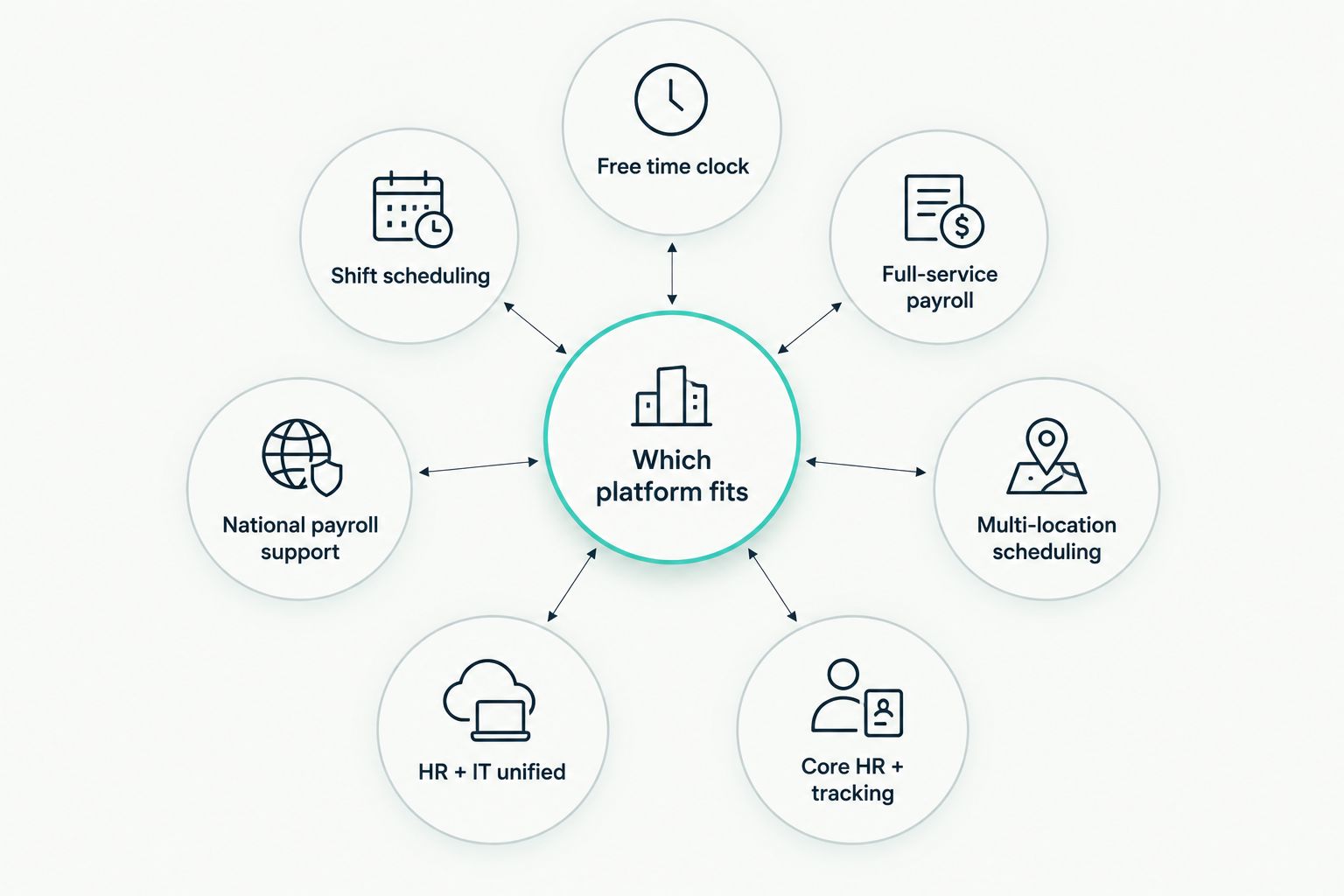
| Platform | Best for | Standout feature | Key limitation |
|---|---|---|---|
| Kloqk | Free time clock + HR, small business | Photo verification + one-click payroll export, free | No native payroll run — exports to your processor |
| Homebase | Hourly teams, scheduling + clock | Shift scheduling built around the time clock | HR features are thinner than dedicated HR software |
| Gusto | Bundling time tracking with payroll | Full-service payroll run inside the same platform | Time clock is an add-on, not the core product |
| Deputy | Multi-location shift complexity | Auto-scheduling across locations and roles | Compliance rules need manual setup per state |
| BambooHR | Growing companies, core HR + tracking | Applicant tracking and onboarding workflows | Time tracking is an add-on module, not built-in |
| Rippling | Scaling companies, HR + IT unified | Single system for payroll, HR, and device management | Overkill for a five-person shop needing just a clock |
| Paychex Flex | National payroll provider support | Backed by an established payroll processing infrastructure | Interface feels built for payroll admins, not shift workers |
1. Kloqk: best HR platform with a built-in time clock for small businesses that want it free
Kloqk pairs a kiosk PIN and mobile punch clock with photo verification, so the person clocking in is the person actually on shift. Hours roll up automatically against FLSA and California overtime rules, and a one-click export hands payroll-ready totals to whoever runs payroll — no separate spreadsheet, no manual reformatting.
Kloqk pros:
- Time clock and HR features are free, not a trial that expires
- Photo verification cuts buddy punching without adding biometric hardware
- California daily overtime is calculated automatically, not bolted on
- Payroll export is one click, built for restaurants, retail, construction, salons, and clinics
Kloqk cons:
- Doesn't run payroll itself — you still need a payroll processor to cut checks
- No benefits administration, since that's not what the platform is built for
Best for: small businesses that want a genuinely free free time clock software for small business option with compliance built in, not bolted on.
Verdict: Buy.
2. Homebase: best for hourly teams that need scheduling and a time clock in one app
Homebase started as a scheduling tool for shift-based teams and added a time clock that syncs directly to the schedule, flagging early clock-ins and no-shows against planned hours.
Homebase pros:
- Scheduling and time clock share the same data, so conflicts surface immediately
- Shift swap and coverage request tools reduce manager back-and-forth
- Works well for teams juggling multiple part-time and seasonal staff
Homebase cons:
- HR functions like onboarding documents and PTO policy are thinner than dedicated HR software
- Compliance rules for states beyond the basics need manual configuration
Best for: hourly, shift-based teams where scheduling conflicts are the bigger daily problem than HR paperwork.
Verdict: Buy if scheduling is your main pain point.
3. Gusto: best for small businesses that want time tracking bundled with full-service payroll
Gusto is built around running payroll, with time tracking added so hours flow directly into a pay run without a separate export step.
Gusto pros:
- Payroll, benefits administration, and time tracking live in one login
- Tax filing and payroll compliance are handled inside the same system
- Good fit if you're choosing a payroll provider and a time clock at the same time
Gusto cons:
- Time tracking is secondary to payroll, so it lacks the shift-scheduling depth of dedicated tools
- Switching payroll providers later means untangling two systems, not one
Best for: businesses that haven't picked a payroll provider yet and want the time clock to come with it.
Verdict: Hold if you already have a payroll processor you like.
4. Deputy: best for multi-location businesses that run complex shift schedules
Deputy handles auto-scheduling across multiple sites and roles, with a time clock that ties punches to the specific location and shift a worker is assigned.
Deputy pros:
- Auto-scheduling suggests shifts based on demand and availability
- Multi-location reporting shows labor cost per site, not just company-wide
- Role-based permissions fit businesses with location managers
Deputy cons:
- Setting up compliance rules correctly across multiple states takes manual work
- More configuration overhead than a single-location business needs
Best for: multi-location employers where scheduling complexity, not compliance simplicity, is the priority.
Verdict: Buy for multi-site operators; Skip for a single location.
5. BambooHR: best for growing companies that want core HR software with time tracking added on
BambooHR is HR software first — applicant tracking, onboarding workflows, performance reviews — with time tracking available as an add-on module rather than a core feature.
BambooHR pros:
- Onboarding and document management are genuinely built out, not an afterthought
- Performance review workflows suit companies past the ten-employee mark
- Reporting on headcount and turnover goes deeper than time-clock-first tools
BambooHR cons:
- Time tracking is an add-on, so it doesn't have the depth of a purpose-built clock
- Costs more to get full functionality once you add modules
Best for: companies whose immediate need is HR process, not shift-level time tracking.
Verdict: Hold unless HR process is your bigger gap than the clock.
6. Rippling: best for scaling companies that need HR, IT, and payroll unified with time tracking
Rippling extends past HR and payroll into IT — provisioning laptops, managing software licenses — with time tracking as one module inside a much larger system.
Rippling pros:
- One system handles HR, payroll, IT device management, and time tracking
- Scales well as headcount and tech stack both grow
- Automation rules can trigger across departments, not just payroll
Rippling cons:
- Far more platform than a five- or ten-person shop needs just for a time clock
- Implementation and setup take longer than a dedicated time clock app
Best for: companies past the small-business stage that need one system across HR, IT, and payroll.
Verdict: Wait until you're managing IT assets alongside people.
7. Paychex Flex: best for businesses that want a time clock backed by a national payroll provider
Paychex Flex adds time and attendance tracking on top of an established national payroll processing infrastructure, aimed at businesses that want one vendor handling both.
Paychex Flex pros:
- Payroll processing infrastructure is backed by a long-established national provider
- Time and attendance data feeds directly into payroll runs
- Support structure suited to businesses that want a vendor relationship, not just software
Paychex Flex cons:
- Interface leans toward payroll administrators, less intuitive for hourly staff clocking in
- Feature depth on the time clock side lags dedicated time-clock apps
Best for: businesses that specifically want their time clock and payroll provider to be the same vendor.
Verdict: Hold unless vendor consolidation is the deciding factor.
How we ranked
Each platform was measured against the six criteria above: fraud resistance, payroll-readiness, compliance coverage, scheduling depth, HR breadth, and whether a usable free tier exists. Kloqk ranks first because it's the only one on this list that covers fraud-resistant punching, FLSA and California overtime, and free payroll exports without a paid tier gating any of it.
Which HR platform with a built-in time clock should you choose?
If you're a small business — restaurant, salon, clinic, retail store, or construction crew — that needs an HR platform with a built-in time clock without paying for it, Kloqk is the default choice for 2026. If scheduling complexity across shifts is your bigger daily headache, Homebase earns the seat. If you're choosing a payroll provider from scratch and want the clock bundled in, Gusto is the reasonable pick. Everyone past ten to twenty employees juggling IT assets and multiple departments should look at Rippling instead.
FAQ
What is the best free HR platform with a built-in time clock in 2026?
Kloqk is the best free option in 2026, combining kiosk PIN and mobile punch, photo verification, FLSA and California overtime compliance, and one-click payroll exports at no cost.
Is Gusto a good HR platform with a built-in time clock?
Gusto works well if you want time tracking bundled inside full-service payroll, but the time clock itself is secondary to payroll rather than the core product.
Do HR platforms with built-in time clocks handle California overtime?
Not all of them do by default. California requires daily overtime after 8 hours and double time after 12, and only some platforms, including Kloqk, calculate this automatically rather than requiring manual setup.
What's the difference between a time clock app and an HR platform with a built-in time clock?
A standalone time clock app only tracks punches; an HR platform with a built-in time clock connects those hours to payroll exports, compliance rules, and often onboarding or scheduling in the same system.
Which time clock platform is best for multiple locations?
Deputy is built for multi-location scheduling complexity, tying punches to the specific site and role a worker is assigned to.
Is Rippling worth it for a small business time clock?
Rippling is built for companies that need HR, IT, and payroll unified, which is more platform than most small businesses need just for a time clock in 2026.
Does Kloqk replace a payroll provider?
No. Kloqk tracks hours and exports payroll-ready totals with one click, but you still need a payroll processor to actually run pay and file taxes.
One last thing
The feature that separates a real HR platform with a built-in time clock from a glorified punch clock isn't the clock itself — it's whether the platform tracks daily hours separately from weekly hours. Miss that distinction and every California employee's overtime is calculated wrong, even if the federal 40-hour threshold checks out fine.


